Worldbuild

Coming soon · Windows · macOS
Deez Fuel Gauge
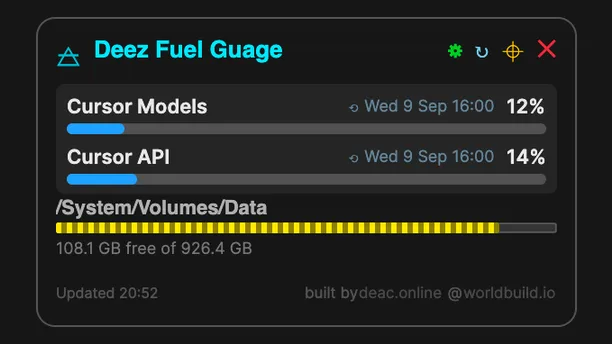
See how much of your AI plan is left, without opening a billing page.
A small overlay that sits on your desktop and shows your usage caps for Cursor, Codex, Claude and Gemini, plus an optional glance at disk, CPU, GPU and RAM. For Windows 10/11 and macOS 12+.
The problem
You only find out you've hit the limit when you hit it.
If you code with AI tools, your plan has caps: a monthly pool, a five-hour window, a weekly limit. Each tool tracks them somewhere different, usually on a settings or billing page you never have open.
So the first warning is often the model refusing to carry on halfway through a task, or a surprise bill at the end of the month.
Fuel Gauge keeps every limit you care about in one small pill on your screen, refreshed every five minutes, so you can pace yourself.
Cursor with no API key
Reads usage from your existing Cursor login on the same machine.
More providers if you want them
Optional bars for Codex / ChatGPT, Claude.ai, Gemini App and platform API spend, each switched on separately in settings.
Compact mode
Shrink it to short codes and percentages, so C is Cursor and CL is Claude.ai, and it barely takes any room.
Stays out of the way
Drag it anywhere and it remembers the spot. Right-click to refresh or quit. Optional start at sign-in.
Keys kept local
Any API keys you add are encrypted in the settings folder. Tokens only go to each vendor's own API.
Want it when it's packaged?
It's open source and runs from the repo today if you have the .NET 8 SDK. Leave your email and we'll tell you when there's a proper installer. It relies on undocumented vendor endpoints that can change, and it isn't affiliated with Cursor, OpenAI, Anthropic or Google.